In case a lens optical axis does not align with a camera sensor axis, a center of image on the monitor moves out of center
position when zoom in. This movement is caused by slight individual tolerance both of lens and camera axis. You can
align the lens/sensor axis by a boresight adjustment ring and a hexagonal driver (accessories) following the below steps.
<Boresight Adjustment procedure>
① Remove a mount fix ring. (Please be careful, the C-mount may drop off when you remove a mount fix ring.)
② Attach a boresight adjustment ring for fixing C-mount.
③ Assemble a camera onto a lens, then take an image on a monitor.
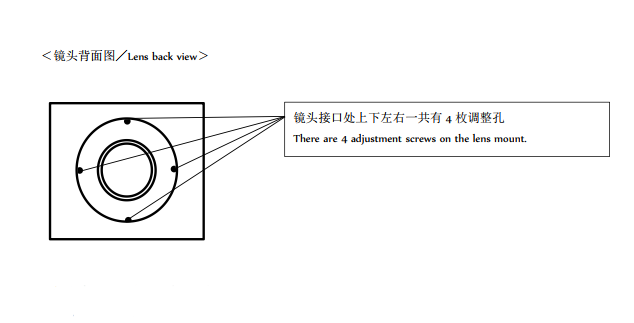
④ Align the boresight by a hexagonal driver. Adjustment screws (4 pcs) are located on the mount ring. The steps how to
align the boresight is explained below.
1)Repeat zoom in and out by a controller, then find out “a point” on a monitor screen where the object does not
move at wide through telephoto end. This “fix point” is usually existing around a center of screen.
2)Move this “fix point” onto just center of a monitor screen by adjusting four screws on the mount ring. To make
this adjustment easy, we recommend to put any marking at the center of screen first.) ***Caution: Do not loosen
the four screws all together, the mount block may drop off.
3)The relationship between each screw direction and movement of a “fixed point” on the monitor is shown in the
below illustration. Move the “fix point” onto a center of screen at wide end first, then make sure the point stays
in the center also at telephoto end. Keep adjusting four screws until the “fix point” comes to right center of
screen at wide end through telephoto end.
⑤ Remove camera and boresight adjustment ring, then put a mount fix ring back again. The boresight adjustment
finished.